Pages

OracleEBSpro is purely for knowledge sharing and learning purpose, with the main focus on Oracle E-Business Suite Product and other related Oracle Technologies.

I'm NOT responsible for any damages in whatever form caused by the usage of the content of this blog.

I share my Oracle knowledge through this blog. All my posts in this blog are based on my experience, reading oracle websites, books, forums and other blogs. I invite people to read and suggest ways to improve this blog.


Showing posts with label GL. Show all posts

Tuesday, November 22, 2016

Security Rule in R12

Security Rule allows restricting user access to various key flexfield segments list of value.
1. Enable security on the value set.To enable security for a value set, choose either Non-Hierarchical Security or Hierarchical Security for the Security Type.
With hierarchical security, a security rule that applies to a parent value also applies to its child values.
2. Navigate to System Administrator->Application->Flexfield->Key->Segments and query the Application,Title and Structure(Accounting flexfield structure)
3. Click on the segments button and after selecting the segment to which security rule is to be applied, click on open button.
4. Ensure that the “Security Enabled” check box is enabled.
5. Navigate to General Ledger Super User->Setup->Financials->Flexfields->Key->Security->Define
6. Query the Application,Title and Structure(Accounting flexfield structure).Then select the required Segment(Independent Segment)
7. Enter the Security Rule name,description and the error message that needs to be displayed.
8. Under security Rule Elements,select the segment values that needs to be included and excluded.By default all values will be excluded.From and To value can be selected same or a range(like From 100- To 300).Then save it.
9. Navigate to General Ledger Super User->Setup->Financials->Flexfields->Key->Security->Assign
10. Query the Application,Title and Structure(Accounting flexfield structure).Then select the required Segment(Independent Segment)
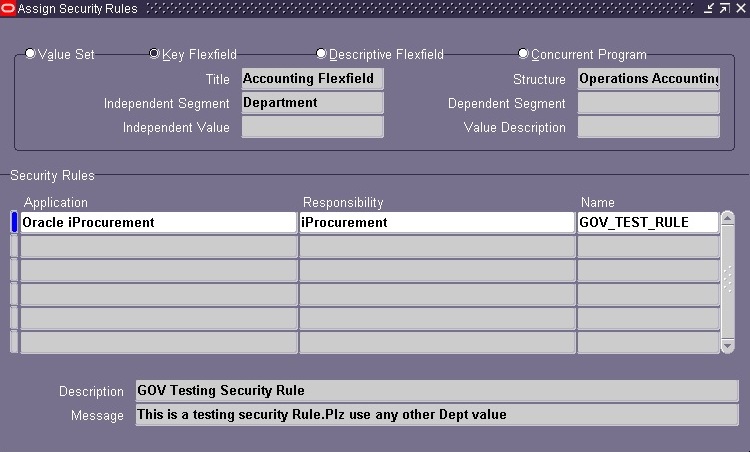
11. Select the application and responsibility to which security rule needs to be applied and set the Security Rule name under Security rules section.
12. Navigate to Responsibility against which security rule is set and try entering the segment value for security rule was set.
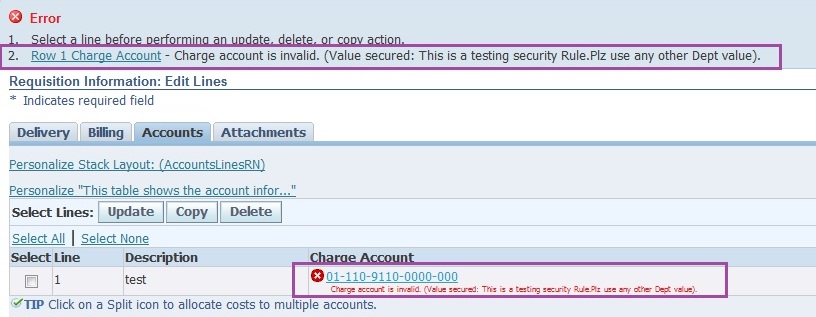
In above example,try navigating to iProcurement responsibility and try entering charge account.
It will allow to enter only values that are included for that segment.For others it will show the error message which we have set.
References:
https://govoracleapps.wordpress.com/2013/06/01/security-rule/
https://orafinappssetups.blogspot.com/2013/01/security-rules-in-r12.html
http://oracleapps88.blogspot.com/2011/08/gl-flexfield-security-rules.html

Friday, September 2, 2016

Basics of Accounting

This is how the accounting works. Everything pertains to what an Organization owns, have and what it has to give. There is always a balance to what it owns and what it has to give.
This “balance” is converted into an equation, also called the Accounting Equation, which is:
ASSETS = LIABILITIES + OWNER’S EQUITY
though I’ve understood it this way:
OWNER’S EQUITY =  ASSETS – LIABILITIES
Let’s take a simple example to justify the above equation, say you have Rs.1,000 but you know that you have to pay a loan of Rs.400 that you borrowed from your friend.
So according to the equation Rs.1000 is your Asset, Rs.400 loan is your Liability and Rs.600 is the Equity that you own.
Every organization which is registered with Government is obliged to disclose the above mentioned balance in a document called Balance Sheet.
That’s all for the accounting equation.
Moving on after the accounting equation,
There is a
  • Debit (Always on the Left Side, written as “DR” for shorthand) and
  • Credit (Always on the Right Side, written as “CR” for shorthand)
  • Debit Side should always be equal to Credit Side or
  • Left Side should always be equal to Right Side or
  • DR = CR
With the Debit and Credit comes in the
  • Increase in balance or
  • Decrease in balance
There are 5 natures of account. Every account can have any one nature and that’s why we can also call it natural account. These natures are:
  1. Assets
  2. Liabilities
  3. Revenue
  4. Expenses
  5. Owner’s Equity

ALORE stands for Asset, Liability, Owner's Equity, Revenue, Expense (general ledger accounting)


ASSET: Literally asset is any thing which is valuable to a person, organization or any entity. For example we say that “his quick learning ability is an asset to him” or “Her writing ability is her asset”. Why do we say that? Because quick learning skill or writing ability adds value to a person. A writer sells his writing skills to earn money, similarly in terms of business anything which is valuable to a business is the asset.
Say your organization is a pharmaceutical and manufactures Medicines, then all the chemicals used to manufacture medicine is your asset or in other words the Raw Material is your asset. The cash your organization own is an asset because it can be used to buy items or pay your employee who in turn are used to run your business. There are different types of assets, the broader categories of asset are Current Asset and Fixed, but let’s not discuss it here. For now it is enough to know that asset is anything which is valuable to your organization.
Asset INCREASES when it is Debited and DECREASES when Credited.
Any organization which is registered with the government and exists as Legal Entity is obligated to disclose its Assets on the balance sheet to the government and its Creditors. You might ask Who are creditors and Why is it that an organization is obligated to disclose asset to them? With Creditor comes in the liability.
LIABILITY: Comes from the word “Liable”. Literal meaning of Liable is “to be obligated” , “to be responsible” or “Legally responsible”. In terms of accounting you become liable, responsible to pay when you buy or purchase any thing from another entity. You are liable to compensate whatever you’ve bought. Generally an organization records its liability and pays it afterward. Again, there are different types of liabilities like Short Term Liability and Long Term Liability.
Liability INCREASES when it is Credited and DECREASES when Debited.
OWNER’S EQUITY: This is the share of owner in the business.
Equity INCREASES when it is Credited and DECREASES when Debited.
REVENUE: By definition it is the total gain before inducting any expense. It is mostly associated with the Asset. When any organization sell goods or renders its services, it records an increase in Asset and with this increase comes the gain it has made from selling the goods or services. This gain is called Revenue or Income.
Revenue INCREASES when it is Credited and DECREASES when Debited.
Revenue are not displayed in Balance Sheet. They are reflected in Owner’s Equity.
EXPENSE: By definition any payment made is an expense. How payments are made? Either by Cash or Credit which eventually means Cash. So redefining Expense “The outflow of cash to any person or organization for its supplied Goods or rendered Services”. We incur expenses daily, for example, taxi fare is an expense, dine-out payments are expenses. Expenses are associated with Liability. Whenever an organization books a liability, it is mostly against some expense. There are different type of expense
Expense INCREASES when it is Debited and DECREASES when Credited.
Following table shows the Tabular form of the effect
NatureDEBITCREDIT
AssetIncrease (+)Decrease (-)
LiabilityDecrease (-)Increase (+)
EquityDecrease (-)Increase (+)
RevenueDecrease (-)Increase (+)
ExpenseIncrease (+)Decrease (-)
In Oracle General Ledger, when we attach the “Natural Account” Flexfield Qualifier to a segment. System attaches the 5 nature on the Value form. When we add the Natural Account Value, we have to define the nature of the account as well.
When we define the natures of the account, the accounting rules of Debit and Credit works accordingly. Like in Payables, the line item is Debit side, so if you’ll give an expense or asset account, it will increase and vice versa.
It is necessary to understand the application accounting behavior in order to properly suggest and implement the accounting solution in an organization.
References:
http://www.oracleerpappsguide.com/2014/07/basics-of-accounting.html

Thursday, August 29, 2013

Order to Cash Tables and Data Flow

--ORDER MAIN TABLES
select flow_status_code, booked_flag, a.* from oe_order_headers_all a where order_number = '4025794';
select flow_status_code, a.* from oe_order_lines_all a where header_id = 795291;
select * from oe_price_adjustments where header_id = 795291 and line_id = 2440080;
select * from oe_order_price_attribs where header_id = 795291 and line_id = 2440080;
select * from oe_order_holds_all where header_id = 795291 and line_id = 2440080;

--DELIVERY TABLES
select * from wsh_delivery_details where source_header_id = 795291 and source_line_id = 2440080;
select * from wsh_delivery_assignments where delivery_detail_id = 4537129;

--PICK RELEASE (from SHIPPING tab)
--Concurrent Program "Pick Selection List Generation" kicks off after releasing order from SHIPPING.
--This in turn kicks off "Pick Slip Report" and "Auto Ship Confirm Report (Auto Ship Confirm Report)"
select * from wsh_new_deliveries where delivery_id = 653581;
select * from wsh_picking_batches where name = '653581';
select * from wsh_serial_numbers where delivery_detail_id = 4537129;

--MOVE ORDER
select * from mtl_txn_request_headers where request_number = '689455';
select * from mtl_txn_request_lines where header_id = 690521;

--SHIP CONFIRM
--Shipping Transaction for after entering serial numbers.
--Kicks off "Interface Trip Stop" very imp program that affects Inventory.
select * from mtl_material_transactions where source_code = 'ORDER ENTRY' and transaction_reference = 795291 and trx_source_line_id = 2440080;
select * from mtl_unit_transactions where inventory_item_id = 379603 and serial_number in ('SUMIT00','SUMIT01'); 
select * from mtl_serial_numbers where inventory_item_id = 379603 and upper(serial_number) in ('SUMIT00','SUMIT01');

--Run "Workflow Background Process" for "OM Order Line" 
select * from ra_interface_lines_all where interface_line_context = 'ORDER ENTRY' and interface_line_attribute1 = '4025794';
select * from ra_interface_salescredits_all where interface_line_context = 'ORDER ENTRY' and interface_line_attribute1 = '4025794';
select * from ra_interface_distributions_all where interface_line_context = 'ORDER ENTRY' and interface_line_attribute1 = '4025794';

--Run "Auto Invoice Master Program" and that will kick "Auto Invoice Import" program that will create invoice for the order
-- "Prepayment Matching Program (Prepayments Matching Program)"
select * from ra_customer_trx_all where interface_header_attribute1 = '4025794' and creation_date >= trunc(sysdate);
select * from ra_customer_trx_lines_all where interface_line_attribute1 = '4025794' and creation_date >= trunc(sysdate);
select * from ra_cust_trx_line_salesreps_all where customer_trx_line_id = 5758780;
select * from ra_cust_trx_line_gl_dist_all where customer_trx_line_id = 5758780;
select * from ar_payment_schedules_all where trx_number = '50133102';

--Receipt against invoice
select * from ar_cash_receipts_all where receipt_number like '12345%' and creation_date >= trunc(sysdate);
select * from ar_receivable_applications where cash_receipt_id in (130168,130169);

--Run "General Ledge Transfer Program
--This kicks off "Revenue Recognition" and "Revenue Contingency Analyzer" and "Update Posting Control" program 
select * from gl_interface where date_created >= '10-JUN-2011' and user_je_category_name = 'Sales Invoices' and user_je_source_name = 'Receivables'
and reference10 like '%50133102%' and reference24 = '50133102' and reference23 = '42596305';

--Run "Journal Import
select * from gl_je_batches where creation_date >= '13-JUN-2011' order by je_batch_id desc;
select * from gl_je_headers where je_source = 'Receivables' and je_category = 'Sales Invoices' and je_batch_id = 1592931;
select * from gl_je_lines where je_header_id = 1750124;

--Post Journals "Posting"
select * from gl_balances where last_update_date >= '13-JUN-2011' ;

Monday, August 12, 2013

How to Create Code Combination ID by API

--Create Function
CREATE OR REPLACE FUNCTION APPS.XXX_CREATE_CCID
( P_CONCAT_SEGS IN VARCHAR2
) RETURN VARCHAR2
IS
L_STATUS BOOLEAN;
L_COA_ID NUMBER;
BEGIN
SELECT CHART_OF_ACCOUNTS_ID
INTO L_COA_ID
FROM GL_SETS_OF_BOOKS
WHERE SET_OF_BOOKS_ID = 2021; –UPDATE THIS WITH SET OF BOOKS ID
L_STATUS := FND_FLEX_KEYVAL.VALIDATE_SEGS(
‘CREATE_COMBINATION’,
‘SQLGL’,
‘GL#’,
L_COA_ID,
P_CONCAT_SEGS,
‘V’,
SYSDATE,
‘ALL’, NULL, NULL, NULL, NULL,
FALSE,FALSE, NULL, NULL, NULL);
IF L_STATUS THEN
RETURN ‘S’;
ELSE
RETURN ‘F’;
END IF;
END ;
/
--EXECUTE FUNCTION
DECLARE
RETVAL VARCHAR2(200);
P_CONCAT_SEGS VARCHAR2(200); /* ’10.2001.2211101.987872.001.0000′ THIS COMBINATION I WANT TO CREATE */
BEGIN
RETVAL := APPS.XXX_CREATE_CCID ( P_CONCAT_SEGS );
COMMIT;
END;

Friday, April 26, 2013

SQL to Verify to Ledger Setups - R12


SELECT GLV.LEDGER_CATEGORY_CODE,
       GLV.NAME,
       GLV.SHORT_NAME,
       GLV.DESCRIPTION,
       GLV.CHART_OF_ACCOUNTS_ID,
       GLV.PERIOD_SET_NAME                ACCOUNTING_CALENDAR,
       GLV.CURRENCY_CODE,
       GLV.SLA_ACCOUNTING_METHOD_CODE,
       GLV.FIRST_LEDGER_PERIOD_NAME,
       GLV.FUTURE_ENTERABLE_PERIODS_LIMIT,
       GLV.SLA_DESCRIPTION_LANGUAGE,
       A.CONCATENATED_SEGMENTS            ENTERED_CURRENCY, --GLV.SLA_ENTERED_CUR_BAL_SUS_CCID,
       B.CONCATENATED_SEGMENTS            RETAINED_EARNING, --GLV.RET_EARN_CODE_COMBINATION_ID,
       C.CONCATENATED_SEGMENTS            ROUNDING_ACCOUNT, -- GLV.ROUNDING_CODE_COMBINATION_ID ,
       GLV.ALLOW_INTERCOMPANY_POST_FLAG,
       GLV.ENABLE_JE_APPROVAL_FLAG,
       GLV.PERIOD_END_RATE_TYPE,
       E.USER_CONVERSION_TYPE, -- GLV.PERIOD_AVERAGE_RATE_TYPE,
       D.CONCATENATED_SEGMENTS            TRANSLATION_ACCOUNT,
       GLV.CUM_TRANS_CODE_COMBINATION_ID
  FROM GL_LEDGERS                GLV,
       GL_CODE_COMBINATIONS_KFV  A,
       GL_CODE_COMBINATIONS_KFV  B,
       GL_CODE_COMBINATIONS_KFV  C,
       GL_CODE_COMBINATIONS_KFV  D,
       GL_DAILY_CONVERSION_TYPES E
 WHERE E.CONVERSION_TYPE = GLV.PERIOD_AVERAGE_RATE_TYPE
   AND GLV.SLA_ENTERED_CUR_BAL_SUS_CCID = A.CODE_COMBINATION_ID
   AND GLV.RET_EARN_CODE_COMBINATION_ID = B.CODE_COMBINATION_ID
   AND GLV.ROUNDING_CODE_COMBINATION_ID = C.CODE_COMBINATION_ID
   AND GLV.CUM_TRANS_CODE_COMBINATION_ID = D.CODE_COMBINATION_ID;

Standard Query To Get Account Description


-- Function and procedure implementations
  FUNCTION To_Get_Account_Desc  (I_LEDGER_ID IN NUMBER,
                                 I_SEGMENT3  IN VARCHAR2,
                                 I_SEGMENT4  IN VARCHAR2,
                                 I_SEGMENT5  IN VARCHAR2) RETURN VARCHAR2 IS
 
  v_description1     Fnd_Flex_Values_Vl.description%TYPE;
  v_description2     Fnd_Flex_Values_Vl.description%TYPE;
  v_description3     Fnd_Flex_Values_Vl.description%TYPE;
 
  BEGIN
 
 SELECT v.description 
 INTO  v_description1
FROM  Fnd_Flex_Values_Vl v
   , fnd_flex_value_sets S
   , FND_ID_FLEX_SEGMENTS FIFS
   , GL_LEDGERS  L
WHERE v.FLEX_VALUE               = I_SEGMENT3
AND v.FLEX_VALUE_SET_ID          = s.flex_value_set_id
AND FIFS.APPLICATION_ID          = 101
AND FIFS.FLEX_VALUE_SET_ID       = S.FLEX_VALUE_SET_ID
AND FIFS.APPLICATION_COLUMN_NAME = 'SEGMENT3'
AND FIFS.ID_FLEX_CODE            = 'GL#'
AND L.CHART_OF_ACCOUNTS_ID       = FIFS.ID_FLEX_NUM
AND L.LEDGER_ID                  = I_LEDGER_ID;
 
 
SELECT   v.description 
INTO     v_description2
FROM  Fnd_Flex_Values_Vl v
   , fnd_flex_value_sets S
   , FND_ID_FLEX_SEGMENTS FIFS
   , GL_LEDGERS  L
WHERE v.FLEX_VALUE               = I_SEGMENT4
AND v.FLEX_VALUE_SET_ID          = s.flex_value_set_id
AND FIFS.APPLICATION_ID          = 101
AND FIFS.FLEX_VALUE_SET_ID       = S.FLEX_VALUE_SET_ID
AND v.parent_flex_value_low      = I_SEGMENT3
AND FIFS.APPLICATION_COLUMN_NAME = 'SEGMENT4'
AND  FIFS.ID_FLEX_CODE           = 'GL#'
AND L.CHART_OF_ACCOUNTS_ID       = FIFS.ID_FLEX_NUM
AND L.LEDGER_ID                  = I_LEDGER_ID;
 
 
 SELECT v.description 
 INTO  v_description3
FROM  Fnd_Flex_Values_Vl v
   , fnd_flex_value_sets S
   , FND_ID_FLEX_SEGMENTS FIFS
   , GL_LEDGERS  L
WHERE v.FLEX_VALUE               = I_SEGMENT5
AND v.FLEX_VALUE_SET_ID          = s.flex_value_set_id
AND FIFS.APPLICATION_ID          = 101
AND FIFS.FLEX_VALUE_SET_ID       = S.FLEX_VALUE_SET_ID
AND FIFS.APPLICATION_COLUMN_NAME = 'SEGMENT5'
AND  FIFS.ID_FLEX_CODE           = 'GL#'
AND L.CHART_OF_ACCOUNTS_ID       = FIFS.ID_FLEX_NUM
AND L.LEDGER_ID                  = I_LEDGER_ID; 
 
 
  RETURN(v_description1||'-'||v_description2||'-'||v_description3);
  EXCEPTION
 WHEN others THEN
  RETURN(NULL);                             
  END  To_Get_Account_Desc;

Thursday, April 25, 2013

GL Interface


Interface tables:
GL_INTERFACE
Base tables:
GL_JE_HEADERS
GL_JE_LINES
GL_JE_BACTHES
Concurrent Program: Journal Import
Journal Posting  --- populates GL_BALANCES
Validations: check SOB, journal source name, journal category name, actual flag
A – actual amounts
B – budget amounts
E – encumbrance amount
If u enter E in the interface table, then enter appropriate encumbrance ID.
B – budget id.
Check if accounting date or GL date based period name is valid (i.e., not closed).
Check if accounting date falls in open or future open period status.
Check chart of accounts id based on Sob id.
Check if valid code combination.
Check if ccid is enabled.
Check if record already exists in GL interface table.
Check if already journal exists in GL application.
Validations for the staging table:
Check if the input data file is already uploaded into staging table.
Check if the record already exists in the interface table.
Check if the journal already exists in the GL application.
Staging Table:
Create table XX_GL_RY_STG
(status varchar2(50),
set_of_books_id number(15),
User_JE_Source_name varchar2(25),
user_je_category_name varchar2(25),
currency_code varchar2(15),
actual_flag char(1),
ACCOUNTING_DATE date,
DATE_CREATED date,
CREATED_BY number(15),
entered_dr number,
entered_cr number,
accounted_dr number,
accounted_cr number,
segment1 varchar2(25),
segment2 varchar2(25),
segment3 varchar2(25),
segment4 varchar2(25),
segment5 varchar2(25)
);
insert into XX_GL_RY_STG values(
'NEW',1,'Manual' ,'Adjustment','USD','A','20-MAR-2009' ,'20-MAR-2009', 2000,2000,2000,2000,
'01','000','9950','2080','000','0')
Package:
CREATE OR REPLACE PACKAGE XX_GL_INT_RY_PKG
IS
PROCEDURE xx_gl_int_prc(errbuf out varchar2,Retcode out varchar2);
END;
CREATE OR REPLACE Package body XX_GL_INT_RY_PKG
is
Procedure xx_gl_int_prc(errbuf out varchar2,Retcode out varchar2)
is
cursor GL_CUR
IS
SELECT Status,set_of_books_id,User_JE_Source_name,
user_je_category_name,currency_code,actual_flag,
ACCOUNTING_DATE,DATE_CREATED,CREATED_BY,entered_dr,
entered_cr,accounted_dr,accounted_cr,
segment1, segment2, segment3, segment4, segment5
FROM XX_GL_RY_STG;
lv_status varchar2(50);
lv_sob_id Number(15);
lv_user_je_source_name varchar2(25);
lv_user_je_category_name varchar2(25);
lv_cur_code varchar2(15);
lv_actual_flag varchar2(1);
lv_err_flag varchar2(2);
lv_flag varchar2(2);
BEGIN
FOR rec in GL_CUR
LOOP
lv_flag := 'A';
lv_err_flag := 'A';
BEGIN
SELECT distinct Status into lv_status from XX_GL_RY_STG Where status = 'NEW';
EXCEPTION
When no_data_found Then
lv_status := null;
lv_flag := 'E';
lv_err_flag := 'E';
FND_FILE.PUT_line(FND_FILE.LOG,'The status is not correct so change the status');
FND_FILE.PUT_line(FND_FILE.LOG,'The data is inserting'|| lv_status );
END;
BEGIN
SELECT set_of_books_id into lv_sob_id from gl_sets_of_books
where set_of_books_id=rec.set_of_books_id;
Exception
When no_data_found Then
lv_sob_id:=null;
lv_flag := 'E';
lv_err_flag := 'E';
FND_FILE.PUT_line(FND_FILE.LOG,'The SOB is not correct change SOB ID');
End;
FND_FILE.PUT_line(FND_FILE.LOG,'The data is inserting'|| lv_sob_id );
BEGIN
SELECT user_je_source_name into lv_user_je_source_name FROM GL_JE_SOURCES
WHERE user_je_source_name=rec.user_je_source_name;
EXCEPTION
WHEN no_data_found THEN
lv_user_je_source_name := NULL;
lv_flag := 'E';
lv_err_flag := 'E';
FND_FILE.PUT_line(FND_FILE.LOG,'The SOURCE NAME is not correct change It');
END;
FND_FILE.PUT_line(FND_FILE.LOG,'The data inserting is'|| lv_user_je_source_name );
BEGIN
SELECT user_je_category_name INTO lv_user_je_category_name FROM GL_JE_CATEGORIES
where user_je_category_name=rec.user_je_category_name;
EXCEPTION
When no_data_found Then
lv_user_je_category_name:=NULL;
lv_flag := 'E';
lv_err_flag := 'E';
FND_FILE.PUT_line(FND_FILE.LOG,'The Category name is not correct Change it');
FND_FILE.PUT_line(FND_FILE.LOG,'The data inserting is'|| lv_user_je_category_name );
END;
BEGIN
SELECT currency_code into lv_cur_code from FND_CURRENCIES
where currency_code=rec.currency_code;
Exception
When no_data_found Then
lv_cur_code:=null;
lv_flag := 'E';
lv_err_flag := 'E';
FND_FILE.PUT_line(FND_FILE.LOG,'The Currency code is not correct ');
End;
FND_FILE.PUT_line(FND_FILE.LOG,'The data inserting is'|| lv_cur_code);
BEGIN
SELECT ACTUAL_FLAG into lv_actual_flag from XX_GL_RY_STG
where actual_flag in ('A','B','E');
Exception
When no_data_found then
lv_actual_flag := null;
lv_flag := 'E';
lv_err_flag := 'E';
FND_FILE.PUT_line(FND_FILE.LOG,'The Flag is not correct');
END;
FND_FILE.PUT_line(FND_FILE.LOG,'The dat inserting is... '|| lv_actual_flag);
IF lv_flag = 'A' THEN
INSERT into GL_INTERFACE (
STATUS, SET_OF_BOOKS_ID, USER_JE_SOURCE_NAME ,USER_JE_CATEGORY_NAME,
CURRENCY_CODE,ACTUAL_FLAG,
ACCOUNTING_DATE, DATE_CREATED,CREATED_BY, ENTERED_DR,ENTERED_CR,
ACCOUNTED_DR,ACCOUNTED_CR,segment1, segment2, segment3, segment4, segment5)
VALUES (
lv_Status, lv_sob_id, lv_User_JE_Source_name, lv_user_je_category_name,
lv_cur_code,lv_actual_flag,rec.ACCOUNTING_DATE, rec.DATE_CREATED,
1318,rec.entered_dr, rec.entered_cr, rec.accounted_dr,rec.accounted_cr,
rec.segment1, rec.segment2, rec.segment3, rec.segment4, rec.segment5);
END IF;
lv_flag :=null;
lv_err_flag:=null;
END LOOP;
COMMIT;
End;
END XX_GL_INT_RY_PKG;
/
Base tables for GL Daily Rates are—
Gl_DAILY_RATES
Interface table for GL Daily Rates are—
Gl_DAILY_RATES_INTERFACE
Moving the Data from Flat File to Base Table using SQL * LOADER:
Options (Skip =0)
Load data
infile '/ebs/oracle/apps/apps_st/appl/gl/12.0.0/bin/gl_daily_rates.csv'
Insert into table GL_daily_rates_stg
fields terminated by ','
optionally enclosed by '"'
Trailing nullcols
(From_currency ,To_currency, From_conversion_date, To_conversion_date,
User_conversion_type, conversion_rate, Mode_flag)
Moving the data from Staging tables to Base Tables using
Standard Interface Programs:
Create a Staging table based on the requirement
CREATE TABLE XXGL_DRATES_STG (
FROM_CURRENCY VARCHAR2(15),
TO_CURRENCY VARCHAR2(15),
FROM_CONVERSION_DATE DATE,
TO_CONVERSION_DATE DATE,
USER_CONVERSION_TYPE VARCHAR2(30),
CONVERSION_RATE NUMBER,
MODE_FLAG CHAR(1));
Inserting Data into Staging Table:
Insert into XXGL_DRATES_STG Values (
'USD','INR','29-Jan-2009','31-Jan-2009','Corporate','50','I');

Create a Package with validations to move the data into Interface Tables
CREATE OR REPLACE PACKAGE XXGL_DRATES_PKG
is
PROCEDURE DAILY_RATES_PRC(retcode out number,errbuff out varchar2);
END;
CREATE OR REPLACE PACKAGE BODY XXGL_DRATES_PKG
is
PROCEDURE DAILY_RATES_PRC(retcode out number, errbuff out varchar2)
Is
Cursor cur_drates is
Select FROM_CURRENCY, TO_CURRENCY, FROM_CONVERSION_DATE , TO_CONVERSION_DATE ,
USER_CONVERSION_TYPE, CONVERSION_RATE , MODE_FLAG FROM XXGL_DRATES_STG;
LV_FROM_CURRENCY VARCHAR2(15);
LV_TO_CURRENCY VARCHAR2(15);
LV_USER_CONVERSION_TYPE VARCHAR2(30);
LV_CONVERSION_RATE NUMBER;
LV_ERR_FLAG VARCHAR2(1):= 'A';
BEGIN
FOR i IN CUR_DRATES
LOOP
BEGIN
Select CURRENCY_CODE into LV_FROM_CURRENCY FROM
FND_CURRENCIES where CURRENCY_CODE=i.FROM_CURRENCY;
Exception
When NO_DATA_FOUND Then
lv_from_currency := null;
lv_err_flag := 'E';
FND_FILE.PUT_line(FND_FILE.LOG,'The Currency Code is not defined
/not enabled if not enabled enable it.');
end;
FND_FILE.PUT_line(FND_FILE.LOG,'The Currency Code inserting IS--'
|| LV_FROM_CURRENCY );
BEGIN
Select CURRENCY_CODE into LV_TO_CURRENCY
FROM FND_CURRENCIES where ENABLED_FLAG='Y'
AND CURRENCY_CODE=i.To_CURRENCY;
Exception
When NO_DATA_FOUND Then
lv_from_currency := null;
lv_err_flag := 'E';
FND_FILE.PUT_line(FND_FILE.LOG,'The Currency Code is not defined
/not enabled if not enabled enable it.');
end;
FND_FILE.PUT_line(FND_FILE.LOG,'The Currency Code inserting IS--'
|| LV_TO_CURRENCY );
BEGIN
Select USER_CONVERSION_TYPE into LV_USER_CONVERSION_TYPE
FROM GL_DAILY_CONVERSION_TYPES where
USER_CONVERSION_TYPE=i.USER_CONVERSION_TYPE;
Exception
When NO_DATA_FOUND Then
LV_USER_CONVERSION_TYPE := null;
lv_err_flag := 'E';
FND_FILE.PUT_line(FND_FILE.LOG,'The USER_CONVERSION_TYPE is not defined.');
end;
FND_FILE.PUT_line(FND_FILE.LOG,'The USER_CONVERSION_TYPE inserting IS--'
||LV_USER_CONVERSION_TYPE );
BEGIN
Select USER_CONVERSION_TYPE into LV_USER_CONVERSION_TYPE
FROM GL_DAILY_CONVERSION_TYPES where
USER_CONVERSION_TYPE=i.USER_CONVERSION_TYPE;
Exception
When NO_DATA_FOUND Then
LV_USER_CONVERSION_TYPE := null;
lv_err_flag := 'E';
FND_FILE.PUT_line(FND_FILE.LOG,'The USER_CONVERSION_TYPE is not defined.');
end;
FND_FILE.PUT_line(FND_FILE.LOG,'The USER_CONVERSION_TYPE inserting IS--'
||LV_USER_CONVERSION_TYPE );
IF LV_ERR_FLAG='A' THEN
INSERT INTO GL_DAILY_RATES_INTERFACE (
FROM_CURRENCY, TO_CURRENCY,
FROM_CONVERSION_DATE, TO_CONVERSION_DATE,
USER_CONVERSION_TYPE, CONVERSION_RATE,
MODE_FLAG)
VALUES (
LV_FROM_CURRENCY,LV_TO_CURRENCY,
I.FROM_CONVERSION_DATE, I.TO_CONVERSION_DATE
, LV_USER_CONVERSION_TYPE, I.CONVERSION_RATE
, I.MODE_FLAG);
END IF;
END LOOP;
COMMIT;
END;
END XXGL_DRATES_PKG;

Create an Executable – XXGL_DRATES_PKG_EXEC
Execution File
Create a Concurrent program – XXGL_DRATES_PKG_EXEC IFace Conc prg
Add the Conc program to the Request group
In custom module, Run the Conc Program thro’ SRS Window.
In GL MODULE Run the Standard Concurrent Program –
Program - Daily Rates Import and Calculation