What is MOAC?
Multi-Org or multiple organization access (MOAC) is basically an ability to access multiple operating units from a single application responsibility.
Why it has been created?
Prior to R12, end users use to toggle / switch / change responsibilities in order to do transactions (like invoice / payment processing in AP) in different operating units. This is a very time consuming and inefficient way of recording transactions when you have 100s of operating units specially Internet based organizations who have worldwide operations in almost all the countries. To address this, a new feature in R12 has been introduced in which user can switch between operating units within a responsibility something similar to “Change Organization” feature in inventory. Prior to R12, user would have to switch responsibilities in order to enter transactions in respective operating units (tagged to the responsibility).
What are its advantages?
Multi-Org Access Control (MOAC) enables companies that have implemented a Shared Services operating model to efficiently process business transactions by allowing them to access, process and report on data for an unlimited number of operating units within a single applications responsibility.
This increases the productivity of Shared Service Centers, as users no longer have to switch application responsibilities when processing transactions for multiple operating units at a time.
Ability to view data from multiple operating units from a single responsibility, gives users more information. This enables them to make better decisions.
The following SQL will dump out the Security Profiles and Operating Unit Names assigned to them.
SELECT psp.SECURITY_PROFILE_NAME,
psp.SECURITY_PROFILE_ID,
hou.NAME,
hou.ORGANIZATION_ID
FROM PER_SECURITY_PROFILES psp,
PER_SECURITY_ORGANIZATIONS pso,
HR_OPERATING_UNITS hou
WHERE pso.SECURITY_PROFILE_ID = psp.SECURITY_PROFILE_ID
AND pso.ORGANIZATION_ID = hou.ORGANIZATION_ID;
There are three Profile Options you need to be aware of related to Multi-Org that should be set at the Responsibility Level.
MO: Security Profile- Always evaluated first.
MO: Operating Unit- Secondary priority being evaluated after ‘MO: Security Profile’
MO: Default Operating Unit- Sets the default Operating Unit for transactions when running under a Security Profile.
How it is done in R12?
In Release 12, one creates a Security Profile and assigns as many operating units as you required. One can tie that security profile to a single responsibility using a profile option called MO: Security Profile. For example, you could assign the security profile to the EMEA Payables responsibility to allow that responsibility to process invoices across all operating units.
In Release 12, define a security profile in HR using the Security profile form or the Global Security profile form, and assign all of the operating units that one would want a responsibility to access. The one needs to run a concurrent request called “Run Security List Maintenance” from HR which will make those security profile available and allow one to assign them to a responsibility via a profile option called MO: Security Profile.
One can define another profile option called MO: Default Operating Unit which is optional and allows one to specify a default operating unit that will be the default when you open different subledger application forms.
References:
http://amaralam.blogspot.com/2013/04/what-is-moac-multi-org-or-multiple.html
Showing posts with label Multi-Org(MOAC). Show all posts
Showing posts with label Multi-Org(MOAC). Show all posts
Tuesday, October 11, 2016

Thursday, August 25, 2016
Multi-Org SQL queries
select *
from HR_LOCATIONS_ALL;
--BG,LE, OU, IO
select *
from hr_all_organization_units
where type not in ('DIVISION','DEPARTMENT','REGION') or type is null;
--Business Groups
select *
from per_business_groups
where name='XX US Business Group';
--Ledgers
select *
from GL_LEDGERS;
--Operating Units
select *
from hr_operating_units;
--Inventory Orgs
select *
from org_organization_definitions;
--Link between LE, OU & Ledger
select *
from XLE_LE_OU_LEDGER_V
where ledger_name='XX North America Ledger';
SELECT hrl.country, hroutl_bg.NAME bg, hroutl_bg.organization_id,
lep.legal_entity_id, lep.NAME legal_entity,
hroutl_ou.NAME ou_name, hroutl_ou.organization_id org_id,
hrl.location_id,
hrl.location_code,
glev.FLEX_SEGMENT_VALUE
FROM xle_entity_profiles lep,
xle_registrations reg,
hr_locations_all hrl,
hz_parties hzp,
fnd_territories_vl ter,
hr_operating_units hro,
hr_all_organization_units_tl hroutl_bg,
hr_all_organization_units_tl hroutl_ou,
hr_organization_units gloperatingunitseo,
gl_legal_entities_bsvs glev
WHERE lep.transacting_entity_flag = 'Y'
AND lep.party_id = hzp.party_id
AND lep.legal_entity_id = reg.source_id
AND reg.source_table = 'XLE_ENTITY_PROFILES'
AND hrl.location_id = reg.location_id
AND reg.identifying_flag = 'Y'
AND ter.territory_code = hrl.country
AND lep.legal_entity_id = hro.default_legal_context_id
AND gloperatingunitseo.organization_id = hro.organization_id
AND hroutl_bg.organization_id = hro.business_group_id
AND hroutl_ou.organization_id = hro.organization_id
AND glev.legal_entity_id = lep.legal_entity_id
AND hroutl_bg.NAME='XX US Business Group';
from HR_LOCATIONS_ALL;
--BG,LE, OU, IO
select *
from hr_all_organization_units
where type not in ('DIVISION','DEPARTMENT','REGION') or type is null;
--Business Groups
select *
from per_business_groups
where name='XX US Business Group';
--Ledgers
select *
from GL_LEDGERS;
--Operating Units
select *
from hr_operating_units;
--Inventory Orgs
select *
from org_organization_definitions;
--Link between LE, OU & Ledger
select *
from XLE_LE_OU_LEDGER_V
where ledger_name='XX North America Ledger';
SELECT hrl.country, hroutl_bg.NAME bg, hroutl_bg.organization_id,
lep.legal_entity_id, lep.NAME legal_entity,
hroutl_ou.NAME ou_name, hroutl_ou.organization_id org_id,
hrl.location_id,
hrl.location_code,
glev.FLEX_SEGMENT_VALUE
FROM xle_entity_profiles lep,
xle_registrations reg,
hr_locations_all hrl,
hz_parties hzp,
fnd_territories_vl ter,
hr_operating_units hro,
hr_all_organization_units_tl hroutl_bg,
hr_all_organization_units_tl hroutl_ou,
hr_organization_units gloperatingunitseo,
gl_legal_entities_bsvs glev
WHERE lep.transacting_entity_flag = 'Y'
AND lep.party_id = hzp.party_id
AND lep.legal_entity_id = reg.source_id
AND reg.source_table = 'XLE_ENTITY_PROFILES'
AND hrl.location_id = reg.location_id
AND reg.identifying_flag = 'Y'
AND ter.territory_code = hrl.country
AND lep.legal_entity_id = hro.default_legal_context_id
AND gloperatingunitseo.organization_id = hro.organization_id
AND hroutl_bg.organization_id = hro.business_group_id
AND hroutl_ou.organization_id = hro.organization_id
AND glev.legal_entity_id = lep.legal_entity_id
AND hroutl_bg.NAME='XX US Business Group';
Tuesday, August 23, 2016
Multi Org Concept in Oracle Applications E-Business Suite
Since Oracle EBS or E-Business Suite is a complete automated application and caters the need of variety of industries. It has an architecture called MultiOrg or “Multiple Organization”.
Whenever we talk about an organization irrespective of its multiple structure, we will find certain common things or feature or let me call it departments. It is not necessary that every organization has every department. But some departments and/or processes are more or less the same.
What is an Organization? In EBS it is a vague term, infact, varied term. In Oracle EBS an organization can be a Legal Entity, or an Inventory, or a department. Anything can be treated as organization in Oracle. When we go through the Oracle EBS documentation we will find the excessive use word Organization. But it not the organization we refer it to here in daily routine.
In our daily routine if we say the word “organization”, we will certainly be referring to some company, for example, Inbox Business Technologies, IBM, Acer, HP, these are the example of organization selling hardware. But in Oracle Multi Org structure they are referred to as Legal Entities.
The Multi Org structure in Oracle consists of following organizations
BUSINESS GROUP (BG)
A business group is the top level in multi org structure. Oracle view human resource as the basis for the business. A human resource is selling the products that organization is manufacturing, a human resource is purchasing raw materials required to make a product, a human resource is making accounting and financials statement. In short a legal entity transacts because of Human Resources.
In Oracle EBS, Business Group holds the employee information. If there is a Group of Companies and they all are using a single instance of Oracle Apps then every employee in each company will be defined at BG level. Each employee will then be assigned a responsibility. That responsibility determines which company that employee belongs to and what type of transaction can be carried out. When a fresh EBS instance is installed it has a Default Business Group namely Setup Business Group. We usually rename it as per our requirement.
A BG can have multiple ledger attached to it and there can be Multiple Business Groups in one instance.
Oracle HR resides at this level of MultiOrg structure.
LEDGER
Formerly called Set of Book in R11i. Ledger is an accounting book.
Take an example of a utility shop with an old man sitting with a big register. In that register he notes every transaction related to money or finances. Let’s say he sells some bottles of mineral water to a person. He notes the Date on the transaction took place, the Amount involved in that transaction, Person’s name, particulars of goods sold to that person.
This is similar to what we do in a ledger. There are 4C’s concepts in Ledger.
Oracle General Ledger resides at this level.
LEGAL ENTITY
Legal Entity definition by book is any company which is reporting to Government, an entity which exists. In Oracle EBS a company is also referred to as GRE – Government Reporting Entity. A legal entity has a disclosure requirement of their annual revenue. An organization which prepares its Balance Sheet and Income Statement.
Oracle says anything can be your legal entity. Your manufacturing plant can be your legal entity, your departments can be your legal entity. Your inventory can be your legal entity. A legal entity is the one for which you want a Balance Sheet and Income statement. How can a balance sheet be generated for a department is another topic…
OPERATING UNIT
Operating Unit (OU) comes under a ledger with a legal context. “Legal Context” is referred to as the Legal entity to which it is attached. The purpose of an operating unit is to segregate or separate subledger transactions. A legal entity having different branches in Pakistan can treat each branch an operating unit.
Oracle Payables, Purchasing, Receivables, Order Management resides at this level of MultiOrg.
In general an operating unit is the one dealing with paper work. How?
Take an example of P2P (Procure to Pay) cycle. It involves Purchasing and Payables. From Purchasing you generated an RFQ (Request for Quotation) and send it to vendor, against the RFQ you receive a Quotation. Against that quotation you send the PO (Purchase Order), Against that PO you receive Goods and GRN (Goods Received Note), against that GRN you receive payables Invoice, against that invoice you make Payment. Each of these documents are from Oracle Purchasing and Payables.
Similarly there is a O2C (Order to Cash) cycle.
INVENTORY ORGANIZATION
Inventory Organization is last or the lowest level of MultiOrg structure. Inventory organization refers to any kind storage of item, finished goods and raw materials, etc. This storage can be Warehouse, Floors, Cabinets, Drawers, or a logical store which don’t exists physically.
Inventory in general refers to storage and movement of goods from one Inventory organization to another. Inventory has two types of inventory: Master Item Inventory Org, Inventory Organization and Sub-Inventory Org.
Master item inventory stores the every information of item or the definition of item. It does not store the information of location that item is placed or the quantity of item available. Inventory Organization is same as the Master but it has the costing definition, locator information, and types of item it can store. Each Inventory organization should have at least one Sub Inventory Organization. There can be multiple sub inventories under one Inventory Organization. Costing method can also be defined at sub inventory level.
Oracle Inventory, Manufacturing, Warehouse Management, Enterprise Asset Management resides at this level.
References:
http://www.club-oracle.com/threads/multi-org-concept-in-oracle-applications-e-business-suite.16321/
Whenever we talk about an organization irrespective of its multiple structure, we will find certain common things or feature or let me call it departments. It is not necessary that every organization has every department. But some departments and/or processes are more or less the same.
What is an Organization? In EBS it is a vague term, infact, varied term. In Oracle EBS an organization can be a Legal Entity, or an Inventory, or a department. Anything can be treated as organization in Oracle. When we go through the Oracle EBS documentation we will find the excessive use word Organization. But it not the organization we refer it to here in daily routine.
In our daily routine if we say the word “organization”, we will certainly be referring to some company, for example, Inbox Business Technologies, IBM, Acer, HP, these are the example of organization selling hardware. But in Oracle Multi Org structure they are referred to as Legal Entities.
The Multi Org structure in Oracle consists of following organizations
- Business Group or HR Business Group
- Ledger
- Legal Entity or GRE
- Operating Unit
- Inventory Organization
BUSINESS GROUP (BG)
A business group is the top level in multi org structure. Oracle view human resource as the basis for the business. A human resource is selling the products that organization is manufacturing, a human resource is purchasing raw materials required to make a product, a human resource is making accounting and financials statement. In short a legal entity transacts because of Human Resources.
In Oracle EBS, Business Group holds the employee information. If there is a Group of Companies and they all are using a single instance of Oracle Apps then every employee in each company will be defined at BG level. Each employee will then be assigned a responsibility. That responsibility determines which company that employee belongs to and what type of transaction can be carried out. When a fresh EBS instance is installed it has a Default Business Group namely Setup Business Group. We usually rename it as per our requirement.
A BG can have multiple ledger attached to it and there can be Multiple Business Groups in one instance.
Oracle HR resides at this level of MultiOrg structure.
LEDGER
Formerly called Set of Book in R11i. Ledger is an accounting book.
Take an example of a utility shop with an old man sitting with a big register. In that register he notes every transaction related to money or finances. Let’s say he sells some bottles of mineral water to a person. He notes the Date on the transaction took place, the Amount involved in that transaction, Person’s name, particulars of goods sold to that person.
This is similar to what we do in a ledger. There are 4C’s concepts in Ledger.
- Chart of Account (Particulars of Goods)
- Currency (Amount)
- Calendar (Date)
- Subledger Accounting Convention (Cash / Accrual)
Oracle General Ledger resides at this level.
LEGAL ENTITY
Legal Entity definition by book is any company which is reporting to Government, an entity which exists. In Oracle EBS a company is also referred to as GRE – Government Reporting Entity. A legal entity has a disclosure requirement of their annual revenue. An organization which prepares its Balance Sheet and Income Statement.
Oracle says anything can be your legal entity. Your manufacturing plant can be your legal entity, your departments can be your legal entity. Your inventory can be your legal entity. A legal entity is the one for which you want a Balance Sheet and Income statement. How can a balance sheet be generated for a department is another topic…
OPERATING UNIT
Operating Unit (OU) comes under a ledger with a legal context. “Legal Context” is referred to as the Legal entity to which it is attached. The purpose of an operating unit is to segregate or separate subledger transactions. A legal entity having different branches in Pakistan can treat each branch an operating unit.
Oracle Payables, Purchasing, Receivables, Order Management resides at this level of MultiOrg.
In general an operating unit is the one dealing with paper work. How?
Take an example of P2P (Procure to Pay) cycle. It involves Purchasing and Payables. From Purchasing you generated an RFQ (Request for Quotation) and send it to vendor, against the RFQ you receive a Quotation. Against that quotation you send the PO (Purchase Order), Against that PO you receive Goods and GRN (Goods Received Note), against that GRN you receive payables Invoice, against that invoice you make Payment. Each of these documents are from Oracle Purchasing and Payables.
Similarly there is a O2C (Order to Cash) cycle.
INVENTORY ORGANIZATION
Inventory Organization is last or the lowest level of MultiOrg structure. Inventory organization refers to any kind storage of item, finished goods and raw materials, etc. This storage can be Warehouse, Floors, Cabinets, Drawers, or a logical store which don’t exists physically.
Inventory in general refers to storage and movement of goods from one Inventory organization to another. Inventory has two types of inventory: Master Item Inventory Org, Inventory Organization and Sub-Inventory Org.
Master item inventory stores the every information of item or the definition of item. It does not store the information of location that item is placed or the quantity of item available. Inventory Organization is same as the Master but it has the costing definition, locator information, and types of item it can store. Each Inventory organization should have at least one Sub Inventory Organization. There can be multiple sub inventories under one Inventory Organization. Costing method can also be defined at sub inventory level.
Oracle Inventory, Manufacturing, Warehouse Management, Enterprise Asset Management resides at this level.
References:
http://www.club-oracle.com/threads/multi-org-concept-in-oracle-applications-e-business-suite.16321/
Multi - Org Concept in Oracle Apps R12
Multi-Org in simple term means the implementation of multiple business units (or Organization) under a single installation of Oracle Applications. The concept of Multi-Org will manage the operations of an enterprise which has got subsidiaries across globe under a single oracle apps window, taking appropriate care of data security and data maintenance. Below are some of the features of multiple organization functionality.
- Any number of Business Units in an
- User can access the data corresponding to and limited to the operating unit
- Reporting can be managed at different organization levels like, Business Group, Ledger, Operating unit etc
- Transactions like Procurement, Receiving, Selling, Shipping Etc. with the same Party Can be Performed through Different Organization and can be managed internally through inter company postings
A real time organization construct in R12

Here in this example construct, CCS Company has organization structure as follows
- 1 Business Group - Which controls the organization in
- 2 Legal Entities - one in US and one in AU
- 2 Primary Ledgers - one in US and one in AU
- 2 Operating Units - one in US and one in AU
- 3 Inventory Organizations – two in US and one in AU
How Organization Hierarchy flow in Oracle R12
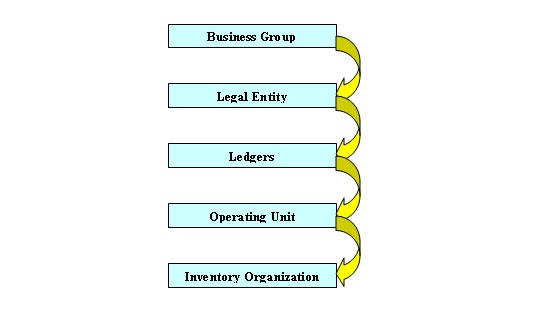
Multi-Org and Multi-Org Access Control in R12 (MOAC)
Prior to R12, user has to switch between responsibilities to enter transaction and for doing other activities for a particular organization. This is very time consuming to do activities in an environment like this if you have 100 operating units. To overcome this factor, oracle has introduced a new feature in R12 which allow the user to switch the organization from the same responsibility which enables the user to access different organization and its data from a single responsibility.
To achieve the new objective, Oracle has introduced new functionality called Multi-Org Access Control (MOAC) in release 12. Following are the set up steps needs to follow for implementing the MOAC architecture for a particular application
Multi – Org Setup Steps in R12
1. Define Location
Open HRMS Manager Responsibility and navigate to Work Structure à Location

Define your location Specific Details (BG Address and time zone) for your Business Group in ‘Address Details’ tab and Shipping details in ‘Shipping Details’ tab as below.

Save the Changes
Following table will hold location details
HR_LOCATIONS_ALL
2. Define Business Group
Open HRMS Manger responsibility and navigate to
Work StructureàOrganizationàDescription

Enter the business group name and assign the location created in the previous step and save the changes

Select the LOV as business group under the ‘Organization Classification’ block
Select ‘Business Group from the LOV and check ‘Enabled’ check box for the business group name and save changes

Now click on ‘Others’ button and select the Business Group info from the additional window and click OK, then another window will get opened with name ‘Additional Organizations Information’ like below

Press TAB and enter the mandatory details like below

Click OK Button, then you will be prompted to save the changes. Press on YES button. The details will get saved.
Following Table will hold business group information
HR_ALL_ORGANIZATION_UNIT
3. Create Legal Entity
As per the structure defined, we have to create the one legal entity for AU operation.
Switch the responsibility to General Ledger and navigate to the following
SetupàFinancialsàAccounting Setup ManageràAccounting Setups
In Release R12, the legal entity setup is a part of accounting setup.

Press button ‘Create Legal Entity’ and enter the Details

Click on ‘Create New Address’ to create the new address

Click ‘APPLY’ to save the changes.

Legal Entity details will be available in the following table
XLE_LE_OU_LEDGER_V
4. Define Ledger
Navigate to Accounting Setup Manager and define the New Ledger for the Legal Entity created

Ledger Details Will be available in the Following table
GL_LEDGERS
5. Create and assign Operating units to Legal Entities to Ledger
In this step we will assign operating unit to Legal Entity. This will be defining from General Ledger responsibility
Navigate to Setup –> Financials –> Accounting Setup Manager –> Accounting Setups
In the Ledger Definition window, enter the Ledger name and press GO button. Once the search finishes and resulted with the Ledger name, Click on ‘Update Accounting Options’ button

Then Assign the Legal Entity to the ledger by clicking ‘Add Legal Entity’ button
Search for the legal entity created in our previous step and click on apply button to save the changes. Now the legal Entity is assigned to Ledger

Now click on Update button next to the operating unit setup option

Click on Add operating unit

Enter the details. Assign the business group and legal entity created from the above steps to the operating unit and click on apply button

After completing all ledger option press ‘Complete’ button to complete the accounting setup
6. Create Inventory Information
Switch to Human Resource responsibility and Navigate to the following
Work Structure àOrganizationàDescription
Click on New Button to create the new Inventory Organization

From the Organization Classifications Frame, select the option Inventory Organization from the LOV.

Press OK to save the Details
No click on ‘Others’ button and select ‘Accounting Information’ option. A small window will open, Press TAB to enter the details in this window

Assign the following to the inventory organization we have created in our previous steps
Primary Ledger
Legal Entity
Operating Unit

Click OK and Click Yes to save the changes
Again Click ‘Others’ button and select the ‘Inventory Information’ from the list

Then add all inventory details and save the changes.
Once the setup is done, run the following reports/programs to use the operating unit we created
In order to use the operating unit, run the following program and it should be run for all the new operating unit structure
Switch the responsibility to ‘System Administrator’
Program :- Replicate Seed Data
Parameter: - <Operating Unit>

Run the following program
Multi-Org Setup Validation Report

Now the operating units and other related setups are ready to use. Now we have to think how we can enable the multiple organization can be enabled from a single responsibility.
Enabling Multi – Org Access Control (MOAC)
MOAC is implemented in R12 to allow the users to submit requests and access data of different operating units in a single responsibility. This functionality can be done by setting the SECURITY PROFILES under HRMS module
There are 2 security profiles:
- SECURITY PROFILE: is used for the selection of operating units from the same business group
- GLOBAL SECURITY PROFILE: is used for the selection of operating units from the different business group
Set up of Multi-Org Access Control:
- Setup Security Profile in HRMS
Switch the responsibility to Human resource
Navigate to the following
Security àProfile
Select the name for the profile and attach the business group created

In order to have access to the security profile we created, we need to create a responsibility and assign this profile option to the responsibility
Switch to System Administrator responsibility and navigate to the following
SecurityàResponsibilityàDefine

Once the responsibility is defined, assign the new security profile option to the responsibility by navigating the following
Profile à System

This is it!!!
We have done with the setup of Multi-Org. This is a key functionality in Oracle R12 which is serving as the stepping stone to Oracle Multi-Org implementation.
Following SQL query can give the relation between Ledger, Legal entity and Operating Units in Oracle Apps R12
SELECT hrl.country, hroutl_bg.NAME bg, hroutl_bg.organization_id,
lep.legal_entity_id, lep.NAME legal_entity,
hroutl_ou.NAME ou_name, hroutl_ou.organization_id org_id,
hrl.location_id,
hrl.location_code,
glev.FLEX_SEGMENT_VALUE
FROM xle_entity_profiles lep,
xle_registrations reg,
hr_locations_all hrl,
hz_parties hzp,
fnd_territories_vl ter,
hr_operating_units hro,
hr_all_organization_units_tl hroutl_bg,
hr_all_organization_units_tl hroutl_ou,
hr_organization_units gloperatingunitseo,
gl_legal_entities_bsvs glev
WHERE lep.transacting_entity_flag = 'Y'
AND lep.party_id = hzp.party_id
AND lep.legal_entity_id = reg.source_id
AND reg.source_table = 'XLE_ENTITY_PROFILES'
AND hrl.location_id = reg.location_id
AND reg.identifying_flag = 'Y'
AND ter.territory_code = hrl.country
AND lep.legal_entity_id = hro.default_legal_context_id
AND gloperatingunitseo.organization_id = hro.organization_id
AND hroutl_bg.organization_id = hro.business_group_id
AND hroutl_ou.organization_id = hro.organization_id
AND glev.legal_entity_id = lep.legal_entity_id
**Please feel free to provide your valuable inputs, questions and concerns on this topic as comments**
Important SQL queries:
The following SQL will dump out the Security Profiles and Operating Unit Names assigned to them.
SELECT psp.SECURITY_PROFILE_NAME,
psp.SECURITY_PROFILE_ID,
hou.NAME,
hou.ORGANIZATION_ID
FROM PER_SECURITY_PROFILES psp,
PER_SECURITY_ORGANIZATIONS pso,
HR_OPERATING_UNITS hou
WHERE pso.SECURITY_PROFILE_ID = psp.SECURITY_PROFILE_ID
AND pso.ORGANIZATION_ID = hou.ORGANIZATION_ID;
Important SQL queries:
The following SQL will dump out the Security Profiles and Operating Unit Names assigned to them.
SELECT psp.SECURITY_PROFILE_NAME,
psp.SECURITY_PROFILE_ID,
hou.NAME,
hou.ORGANIZATION_ID
FROM PER_SECURITY_PROFILES psp,
PER_SECURITY_ORGANIZATIONS pso,
HR_OPERATING_UNITS hou
WHERE pso.SECURITY_PROFILE_ID = psp.SECURITY_PROFILE_ID
AND pso.ORGANIZATION_ID = hou.ORGANIZATION_ID;
References:
http://oracleappslearning.blogspot.com/2013/06/multi-org-concept-in-oracle-apps-r12.html
http://amaralam.blogspot.com/2013/04/what-is-moac-multi-org-or-multiple.html
http://amaralam.blogspot.com/2013/04/what-is-moac-multi-org-or-multiple.html
Subscribe to:
Posts (Atom)