Showing posts with label XML Gateway (EDI). Show all posts
Showing posts with label XML Gateway (EDI). Show all posts
Thursday, August 25, 2016
How to query ECE_ tables?
Begin
MO_GLOBAL.INIT('PO');
-- mo_global.set_policy_context('S',121);
End;
select count(1)
from ECE_POO_LINES_V; --43721
select *
from ECE_POO_HEADERS_V;
select *
from ECE_POO_LINES_V;
select *
from ECE_POO_SHIPMENTS_V;
select *
from po_headers;

Tuesday, August 23, 2016
Oracle EDI Application Transaction Code
EDI module provide standard interface for transactions with your trading partner.
Purchase Order:-
Transaction Code
|
Transaction Name
|
Direction
|
EDIFACT
|
832
|
Price/Sales Catalogue
|
Inbound
|
PRICAT
|
843
|
Response to Request for Quotation
|
Inbound
|
QUOTES
|
856
|
Ship Notice/Manifest
|
Inbound
|
DESADV
|
857
|
Shipment and Billing Notice
|
Inbound
|
-
|
824
|
Application Advice
|
Outbound
|
APERAK
|
850
|
Purchase Order
|
Outbound
|
ORDERS
|
860
|
Purchase Order Change
|
Outbound
|
ORDCHG
|
Order Management:-
Transaction Code
|
Transaction Name
|
Direction
|
EDIFACT
|
850
|
Purchase Oder
|
Inbound
|
ORDERS
|
860
|
Purchase Oder Change
|
Inbound
|
ORDCHG
|
855
|
Purchase Oder Acknowledgment
|
Outbound
|
ORDRSP
|
865
|
PO Change Acknowledgment
|
Outbound
|
ORDRSP
|
Oracle Payables:-
Transaction Code
|
Transaction Name
|
Direction
|
EDIFACT
|
810
|
Invoice
|
Inbound
|
INVOIC
|
857
|
Shipment and Billing Notice
|
Inbound
|
-
|
824
|
Application Advice
|
Outbound
|
APERAK
|
820
|
Payment Order/Remittance Advice
|
Outbound
|
PAYORD-REMADV
PAYEXT-REMADV |
Oracle Receivables:-
Transaction Code
|
Transaction Name
|
Direction
|
EDIFACT
|
810
|
Invoice
|
Outbound
|
INVOIC
|
812
|
Credit Memo/Debit Memo
|
Outbound
|
CREADV/DEBADV
|
Process Manufacturing:-
Transaction Code
|
Transaction Name
|
Direction
|
EDIFACT
|
850
|
OPM: Purchase Order
|
Inbound
|
ORDERS
|
855
|
OPM: Purchase Order Acknowledgment
|
Outbound
|
ORDRSP
|
856
|
OPM: Ship Notice/Manifest
|
Outbound
|
DESADV
|
EDI Transaction Support:-
| ASC X12 | EDIFACT | Document ID | Description |
|---|---|---|---|
| Inbound Transactions | |||
| 810 | INVOIC | INI | Inbound Invoice |
| 832 | PRICAT | CATI | Inbound Price / Sales Catalog |
| 843 | QUOTES | RRQI | Inbound Response to Request for Quote |
| 850 | ORDERS | POI | Inbound Purchase Order |
| 856 | DESADV | ASNI | Inbound Ship Notice / Manifest |
| 857 | No equivalent | SBNI | Inbound Shipping and Billing Notice |
| Outbound Transactions | |||
| 824 | APERAK | ADVO | Outbound Application Advice |
| 810 | INVOIC | INO | Outbound Invoice |
| 820 | PAYORD / REMADV | PYO | Outbound Payment Order / Remittance Advice |
| 830 | DELFOR | SPSO | Outbound Planning Schedule |
| 862 | DELJIT | SSSO | Outbound Shipping Schedule |
| 850 | ORDERS | POO | Outbound Purchase Order |
| 860 865 | ORDCHG ORDCHGACK | POCO POCOACK | Outbound Purchase Order Change Request Outbound Order Change Acknowledgment |
| 856 | DESADV | DNSO | Outbound Ship Notice / Manifest |
References:
http://appsraj.blogspot.com/2014_09_01_archive.html
Wednesday, February 5, 2014
Oracle Apps and ASN
The ASN aka Advanced Shipment Notice is a document that is sent to a buyer in advance of the buyer receiving the product. It is typically used within the context of an EDI environment. It can be used to list the contents of an expected shipment of goods as well as additional information relating to the shipment, such as order information, product description, physical characteristics, type of packaging, marking carrier information, and configuration of goods within the transportation equipment. In the implementation of the transaction the latest the ship notice may be sent is the time of shipment. In practice the ship notices just arrive before the shipment.
 Basic Business Needs
- To receive a Shipping notice in Advance:
- Provide user the ability to electronically receive supplier ship notice into Purchasing by loading an ASN electronically into Oracle Apps using the Receiving Open Interface.
Business FlowTypical Process with company using Oracle EBS would be similar to this:
- Supplier sends ASN.
- EDI validates the data for EDI standards and inserts data into Receiving Interface tables.
- Receiving Open Interface validates ASN data. If accepted shipment lines are populated.
- Supply details are maintained.
- Application Advice is generated. The supplier can check if there is a rejection of ASN through the advice.
Inbound Shipment Notice Transaction (856)If you are using EDI Gateway , make sure you have done setup for Trading partner correctly. These are relevant Oracle Purchasing Profiles and Set-upsThe following is a list of the Purchasing set-ups related to the Receiving Open Interface.
- RCV: Fail All ASN Lines if One Line Fails:If the profile option is set to 'Yes' and any line failed validation, no further validation is performed for the ship notice.
If the profile option is set to 'No' and any line failed validation, the process continues with the next line.- ASN Control:In the Receiving Options window in Purchasing, select Warning, Reject, or
None in the ASN Control field to determine how Purchasing handles the receipt against a purchase order shipment for which a ship notice exists.- PO: Enable SQL Trace for Receiving Processor :If the profile option is set to 'Yes', more detailed error data is provided in the View Log screen of the Submit Request window when you run the Receiving Transaction Processor.
Data Flow Diagram
Here is data flow looks typically when you are using with EDI gateway.

References:Receiving Open Interface tables which got involved in this is:
RCV_HEADERS_INTERFACE
RCV_TRANSACTIONS_INTERFACEYou can use Import Programs to submit ECEASNI.sql (856) to the Concurrent Manager to populate the Receiving Open Interface tables with data from the inbound interface file.This is applicable if you are using EDI Gateway , else you can directly use Receiving Open Interface (RCVTP) program.Use Import Programs to submit the Receiving Open Interface (RCVTP) program to the Concurrent Manager to validate the data in the Receiving Open Interface tables.Hope with this, you can easily implement ASN in EBS. Question, comments are most welcome.
http://www.oracleappshub.com/edi/oracle-apps-and-asn/
Tuesday, July 16, 2013
What is EDI ?
EDI stands for Electronic Data Interchange
To understand the need for EDI, lets take a business flow and transactions involved. Company "C" is a manufacturer and regularly buys raw material from Supplier "S" that would typically involve below transactions for each purchase done.
1. Buyer at Customer "C" enters a Purchase Order in his computer system
2. Buyer sends the PO through email or fax or mail to Supplier "S"
3. Sales team at Supplier "S" validates the PO to ensure that required information is provided
4. Sales team at Supplier "S" enters a Sales Order in his computer system
5. Sales team at Supplier "S" sends the Sales Order acknowledgment to Customer "C" through email or fax or regular mail
Imagine the cost, cycle time, money and risks of data entry errors involved in the above process. What if computer system at Customer "C" exchanges data with computer system at Supplier "S" using an intermediate communication link ? Yes, that's the idea behind EDI.
Organizations that send or receive documents between each other are referred to as "trading partners" in EDI terminology. Trading partners are free to use any method for the transmission of documents. Few of the transmission mediums used are Value Added Network (VAN), Internet/AS and Web EDI.
EDI translation software, popularly known as Translator, validates the partner and checks if the data received meets the standard formats defined before converting it to a desired file format which can be read and imported by the receiver's computer systems (for e.g. ERP)
EDIFACT & X12 are most widely followed EDI standards. The standards prescribe the formats, character sets, and data elements used in the exchange of business documents and forms.
Oracle e-Commerce gateway (earlier EDI gateway) module helps organizations meet their EDI requirements with flexibility to use choice of your translator, EDI standard and yet tightly integrates with other modules from Oracle.
Oracle eCommerce Gateway Overview
The Oracle Gateway resides between the Oracle Applications and the EDI Translator. The Gateway processes data between Oracle Applications and the EDI Translator using ASCII interface flat files.
The EDI Translator accommodates the standards and all the monitoring of transmitting standard formatted data between Trading Partners. For outbound data, the EDI Translator maps data from the Oracle interface flat files to any standards of choice. For inbound data, the EDI Translator maps data from the standards of choice to the Oracle interface flat file. The format and content of this flat file can be easily adjusted using the open interface definition table within the Oracle Gateway, though any changes that are made should also be implemented within the EDI Translator set-up. The Gateway processes data via an interface file which is received from or sent to the EDI Translator. The Gateway is independent of all standard formats since only the business data is found in the Oracle Gateway defined interface files. Additionally, the Oracle Gateway provides general code conversion functions for data such as Unit of Measure, Shipping Codes, Payment Terms, and determines the Trading Partner EDI validation/authorization between the Oracle application and the EDI Translator. Inbound Transactions For inbound transactions Oracle Gateway populates the Application Open Interfaces within the Oracle Application products. All of the necessary application logic to validate and load data is provided by the Application Programming Interface code (APIs), i.e. not by the Gateway. The Gateway only populates the relevant Application Open Interface tables recognized by the APIs for the specific EDI message/transaction. 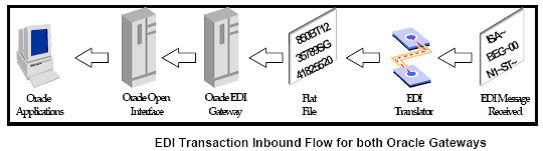 Process Flow The Oracle Gateway performs the following functions during an inbound transaction process after it receives an interface file from the EDI Translator or other process: • Gets Trading Partner validation processing parameters • Applies code conversions (if set up and activated). • Loads valid data into the appropriate Oracle Application Open Interface tables for the transaction. • e-Commerce Gateway captures transaction data exceptions. These exceptions can be reviewed on-line from the staging tables to examine the exception condition. The correction action is performed in a trading partner set up or other application set up. The transaction can then be revalidated. Outbound Transactions For outbound transactions, the Gateway extracts the data from the base Application tables. Also, it may optionally extract data from other files/tables using the built-in extensible architecture using ‘Extension’ tables. The use of Extension tables requires customization of standard code packages provided with the Oracle Gateway if the user has need of this function. 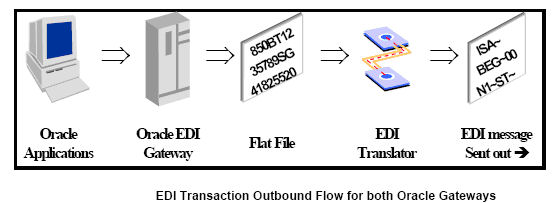 Process Flow The Oracle Gateway outbound transaction process creates interface data files to support any EDI Standard that is available from the EDI Translator. The Oracle Gateway collects all of the business data needed to map to a standard EDI transaction/message which the receiving Trading Partner can interpret properly into their receiving application using their equivalent of the Gateway/EDI Translator set up. The Oracle Gateway does the following: • Gets Trading Partner processing parameters, e.g. location codes, allowable/enabled EDI transactions/messages, etc., • Extracts data from the Oracle base applications tables relevant to the EDI transaction/message being processed. • Optionally, retrieves data from customer defined extension tables (requires some customization). • Applies code conversions (when set up and activated). • Populates Oracle Gateway interface tables with all the data gathered. • Sets the data extract flags in the base Oracle Application table to prevent subsequent extraction. • Produces an interface data file for use by the EDI Translator. Note The Oracle Gateway does not have communication software to transmit the standard formatted data between Trading Partners. The Oracle Gateway relies on the EDI Translator being connected to third party communication service providers to transmit data to, or receive data from, Trading Partners after the data is mapped to the desired standard format. |
Wednesday, April 17, 2013
EDI & E-Business Suite
This is an article is all about EDI, deal mostly with basics and some information with underline Oracle E business Product within the suite. This article start with a typical business case and describe how this is evolves and how important is in ERP, the article helps you understand the high-level overview of the EDI process.
Why EDI Evolved?
Let us consider a simple business scenario. A Customer from PO department who wants to purchase an item creates a purchase order and then faxes it to the suppliers. At the moment vendor receives the purchase order and manually keys in a sales order. The vendor's system generates a confirmation date that is sent back to the customer via fax or mail. The vendor then ships the goods via a carrier. The carrier delivers the products to the customer. When the goods are shipped, the vendor invoices the customer. The customer makes the payment by check, and the vendor deposits the check in the bank. Finally, funds are transferred from the customer's account to the vendor's account.

Figure: Typical business documents exchanged by business partners
Now It clears how much of information needs to be transferred and tracked to run the business, which in reality it is called trading partner. This simple scenario requires the exchange of various documents between several business partners at different times.
All this electronic data was exchanged using floppy disks and other secondary devices. So, ANSI committee was formed to define the standards. Hence the electronic exchange of business documents in a standard format gave birth to what is known as EDI, today the business world had accepted as one of most important entity.
What is EDI?
EDI (Electronic Data Interchange) is the electronic exchange of business documents between the computer systems of business partners, with a standard format over a communication network. It can also be called as paperless exchange.
EDI, electronic funds transfer (EFT), electronic mail and fax are increasingly being used to schedule operations, streamline order fulfilment, and optimise cash flow.

Standard Formats
The business documents that are been exchanged between business partners need to be in a standard format. ANSI X12 (American National Standards Institute) or EDIFACT (Electronic Data Interchange For administration, Commerce, and Transport) are two standards, which supply a common language for formatting the information content that is been exchanged.
The business documents that are been exchanged between business partners need to be in a standard format. ANSI X12 (American National Standards Institute) or EDIFACT (Electronic Data Interchange For administration, Commerce, and Transport) are two standards, which supply a common language for formatting the information content that is been exchanged.
Components
There are five major Components in the EDI Process:
There are five major Components in the EDI Process:
o Sender
o Receiver
o Language
o Content
o Medium
In EDI, the senders and receiver are called trading partners (Customers and Vendors) and the ANSI X12 or EDIFACT standards supply a common language for formatting the information content of common messages.
Oracle's e-Commerce Gateway (EDI Gateway):
A standards-based integration product for Oracle Applications, which allows for companies to integrate Oracle Applications with applications residing inside or outside of the enterprise; communicating via Intranet, Extranet, or Internet.
Oracle's e-Commerce Gateway is independent of all EDI standards and can be integrated with any upstream or downstream process via an ASCII file. Thus, any EDI translator or third party application, that best suits a company's business requirements, can be selected.
Advantage
The major advantage of using Oracle e-Commerce Gateway are listed below:
1. Reduction in labor hours dedicated to data entry
2. Increased data accuracy
3. Quicker communication of key information to and from customers/suppliers resulting in reduced business cycle times and more efficient planning
4. Promotes commonality of business documents and processes
2. Increased data accuracy
3. Quicker communication of key information to and from customers/suppliers resulting in reduced business cycle times and more efficient planning
4. Promotes commonality of business documents and processes
Know the Terminology used in EDI
- Transaction Set - Business document transmitted between companies (e.g. Purchase Order).
- Data Segment - Units of data used to communicate specific information within a message (e.g. the header).
- Data Element - Specific unit of data within a data segment.
- Trading Partner - Entity such as a customer, supplier, or sister organization with whom electronic commerce is executed.
- EDI Standards - Agreed to formats for exchanging electronic data (typically developed by representatives of industry verticals).
- Translator - Software application that translates data into or out of a specific format or standard for processing by an ERP system.
Oracle EDI Gateway - functionality
- Define Trading Partner Relationships
- Define Code Conversions
- Customize Flat File Formats
- Use Standard Report Submission
- Initiate Extract Process
- Initiate Import Process
- View Extract/Import Process Status
A typical flow can be understood as:

A note on File
- ASC X12 is the EDI standard for North America and Canada.
- EDIFACT is the EDI standard for Europe and Asia.
Transaction Supported in Oracle Apps
- v10.6 - supports 4 transactions
- v10.7 - supports 4 transactions
- v11.0 - supports 14 transactions
- v11i - supports 18 transactions
- v11i10.2 - supports 23 transactions
- R12 - data not available
Some Important EDI's Details with Orcle E business suite Modules
Some Important EDI's Details with Orcle E business suite Modules

Monday, February 18, 2013
General Interview (Technical – Functional Questions)
What are different period types?
You use accounting period types to define your accounting calendar. Different Accounting Periods are-
You use accounting period types to define your accounting calendar. Different Accounting Periods are-
- General Ledger Periods (attached to Set of Books),
- Purchasing Periods (Operating Unit Specific),
- Cost Periods (Inventory Organization Specific),
- AP Periods, and
- AR Periods
If it is accounting period types, you can define your own period types to use in addition to the General Ledger standard period types Month, Quarter and Year. You use these period types when you define the accounting calendar for your organization. However the year type should be either Calendar or Fiscal. We have different Period types-
1) 13 Month (13 Month Calendar with An Adjusting Period).
2) Annual.
3) Monthly.
4) Quarterly.
5) Semi Monthly.
6) Weekly.
What types of invoices are there in AP and AR?
Types of Invoices are:
Standard
Credit Memo
Debit Memo
Expenses Report
Prepayment
Mixed
AWT (Automatic Withholding Tax Invoice)
Interest Invoice
PO Default
Quick Match
Mixed
Recurring Invoice
Arrears Invoice
Advance Invoice
Guarantee
Charge Back
Deposit
What is the difference between cross-validation rules and security-rules?
Cross validation rules prevent all the responsibilities/users entering invalid account combinations. Security rules are attached to specific responsibilities to prevent using few of the segment values for a segment. Cross Validation Rule: Rules that define valid combinations of segment values a user can enter in an account. Cross-validation rules restrict users from entering invalid combinations of account segment values. Security Rule: It determines the accounting transaction user can view at different levels of hierarchy, such as at Site Level –>Application Level –> Responsibility Level –> User level. Cross Validation Rule applies across the chart of account where Security Rule is applicable at Responsibility Level or User Level. Cross Validation Rules are meant for defining the set of combinations that are excluded from the global set whereas Security Rules are to restrict Users/Responsibilities. Cross-Validation Rules are to control the certain code combinations. Security Rules are to control the certain segment values.
How many ways can you enter a journal in GL?
1. Manual entry 2. Subledger Entry 3. Spreadsheet Entry 4. Recurring Entry 5. Mass Allocation
What is a recurring invoice?
Recurring Invoice is a type of invoice which occurs at definite intervals of time. The best example for a recurring invoice is Rent paid to the Owner.
What are the general setup steps for AP, AR, and GL?
For GL:
1. Define Chart of Accounts2. Define Calendar
3. Define Currency
4. Create Set of Books
For AP:
1. Define Suppliers (Creditors)
2. Invoice
3. Look up codes
4. Selection of Set of Books
5. Payment Terms
6. Financial & Payable Options
7. Define Banks
For AR:
1. Flexifield
2. System Options
3. Payment Terms
4. Open period
5. Auto Accounting
6. Transaction Type
7. Transaction Source
How do we integrate AP or AR to GL ?
There is a program in payables to transfer AP to GL is “payables transfer to general ledger” GL is like AR->GL<-AP, AR and AP both transfer the data in GL. AR Contains all Invoices/Receipts /CM/DM and same way AP also have AP Vouchers. Yes, there is a clear Integration of AP/AR with GL.
The integration is like this: all the accounting created in subledgers (AP/AR) are transferred to Gl. The journal created from AP/AR are clearly identified in GL according to their batch names and journal names.
What is the difference between GL date and GL posted date in GL ?
GL date is the date used to determine the correct accounting period for your transactions where as the GL posting date is the date when the journal entry is posted the GL. GL date is the date used to determine the correct accounting period for your transactions where as the GL posting date is the date when the journal entry is posted the GL, also Called Transaction Date & Posted Date.
In GL there is no org id. So how can we differentiate the data different operating units when no other modules are given ?
HR data is at business group level. GL Data is differentiated based on set of books id. AP and AR data is mostly at operating unit level. Inventory, BOM, WIP data is at inventory organization level. In the gl_sets_of_books we have the set_of_books_id column. This column is enough to differentiate between one operating unit with the other. If you see the multiorg structure of Oracle Apps modules, we’ll see that GL is setup at set of books level. Now you generally won’t get data at OU level. OU data sums up at a higher SOB level. Please follow the below structure if you want more clarification top->bottom HR org->SOB->OU->inventory org
At what stage, the subledger data is posted to GL?
When Transactions are completed in subledgers data may be posted to GL Basically after entering the transactions, report will be taken to verify the transactions. In case, if approval is needed, it is approved after verifying the transactions. Once you are sure that the transactions are correct, the same can be posted to GL. Once it is posted, most of the information for the posted transaction can not be modified in the subledger. In case of any wrong entry, you need to follow the reversal procedure. Practically, the verification of transactions are done only during the initial stages after implementation. Once the system becomes stable, it is not followed strictly. Note: Make sure that GL period is open for the transaction GL date. Close all the periods in subledger after you reconciled all your transactions. Once you close the period, sweep program will run and all the un-posted and future entries will be transferred to next open period. Once this is done run the GL Transfer program and Journal import programs to complete the transaction transfer process. Once this is done you will find un-posted journal entries in GL you can post the same or reverse the same if you find something is missing. GL periods should also been opened and the GL period should be closed at the last.
Why cant interest rates are set uniquely supplier wise in payables module, whereas interest rate is applied to all suppliers the same rate?
Terms and conditions differ with each supplier.
What is FSG and its use?
Financial Statement Generator is a powerful report building tool for Oracle GL. FSG is used by the management for the decision making in the financial sector of the firm or an enterprise.
Uses of FSG :1. Generate financial reports such as income statements and balance based upon the data in your GL.
Note: If you have average balance processing enabled in your set of books, you can report on functional, foreign–entered, or translated average balances.
2. Define your reports with reusable report objects, making it easy to create new reports from the components of reports you’ve already defined. 3. Design custom financial reports to meet specific business needs.
4. Print as many reports as you need simultaneously.
5. Print the same report for multiple companies, cost centers, departments in the same report request.
6. Schedule reports to run automatically.
7. Produce ad-hoc reports whenever you need them.
8. Print reports to tab-delimited files for easy import into client-based spreadsheet programs. In addition, you can use the Report Wizard feature of Applications Desktop Integrator to design and submit your financial reports, as well as view the results, directly from a spreadsheet. 9. Define segment value security rules to restrict financial information contained in FSG report output generated by specific users and responsibilities. Note: To apply segment value security rules, the profile option FSG: Enforce Segment Value Security must be enabled
Explain ADI and its features?
ADI means application desktop integrator. It is a excel file which allows you to transfer the data pertaining to General Ledger, Fixed Assets and Budget to oracle apps and allows to run a request. ADI functionality provides an alternative to users who prefer to load information directly from Microsoft Excel rather than using the Oracle user interface. It should read Oracle Interface Programs (batch jobs) rather than Oracle User Interfaces. Broadly following are the feature / elements of ADI
1. Journal Wizard
2. Budget Wizard
3. Report Wizard.
4. Account Hierarchy Editor.
5. Analysis Wizard.
6. Request Center
ADI allows users take advantage of many of the data-entry shortcuts of a spreadsheet, such as copying and pasting cells, dragging and dropping ranges of cells and using formulas to calculate journal line amounts. ADI validates the data entered against the accounts, security rules and reference information that are defined in the General Ledger (GL).
What is EDI and its functions?
EDI – Electronic Data Interchange, to send the data to another server/destination via EDI server.E-Commerce Gate Way is the one of the Module in Oracle Apps. EDI (Electronic Data Interchange) is way of exchanging the Business documents like Sales Order, Invoice, PO etc., between two business entities in agreed standard format like ASCII X12 format. In oracle application, business documents may be referred as 850POI (purchase order Inbound), 810INO (Invoice Outbound) etc.. There are several third party sources are available which may be use in mapping of several documents from Oracle Format to X12 and vice versa. Some of them like Sterling Commerce, Klein Schmidt…. EDI is a toll where in whenever the customer is sending the PO it gets saved in this toll, again when the supplier after supplying the material will send an invoice through EDI, wherein the EDI of the customer will match the PO with the invoice and the invoice will get processed automatically, in case if it is not matching it will be in the error sheet
Subscribe to:
Posts (Atom)