DECLARE
l_item_tbl_typ ego_item_pub.item_tbl_type;
x_item_tbl_typ ego_item_pub.item_tbl_type;
x_return_status VARCHAR2 (100);
x_msg_count NUMBER;
x_message_list error_handler.error_tbl_type;
BEGIN
fnd_global.apps_initialize (11224
, 20634
, 401
);
l_item_tbl_typ (1).transaction_type := ego_item_pub.g_ttype_update;
l_item_tbl_typ (1).inventory_item_id := 646;
l_item_tbl_typ (1).organization_id := 103;
l_item_tbl_typ (1).pick_components_flag := 'Y';
ego_item_pub.process_items (p_api_version => 1.0
, p_init_msg_list => fnd_api.g_false
, p_commit => fnd_api.g_true
, p_item_tbl => l_item_tbl_typ
, x_item_tbl => x_item_tbl_typ
, p_role_grant_tbl => ego_item_pub.g_miss_role_grant_tbl
, x_return_status => x_return_status
, x_msg_count => x_msg_count
);
DBMS_OUTPUT.put_line ('x_return_status : ' || x_return_status);
error_handler.get_message_list (x_message_list);
FOR i IN 1 .. x_message_list.COUNT
LOOP
DBMS_OUTPUT.put_line (x_message_list (i).MESSAGE_TEXT);
END LOOP;
COMMIT;
END;
===============================================================
SET SERVEROUTPUT ON
DECLARE
l_item_tbl_typ ego_item_pub.item_tbl_type;
x_item_table ego_item_pub.item_tbl_type;
x_inventory_item_id mtl_system_items_b.inventory_item_id%TYPE;
x_organization_id mtl_system_items_b.organization_id%TYPE;
x_return_status VARCHAR2 (1);
x_msg_count NUMBER (10);
x_msg_data VARCHAR2 (1000);
x_message_list error_handler.error_tbl_type;
BEGIN
--Setting FND global variables.
--Replace MFG user name with appropriate user name.
fnd_global.apps_initialize (11224
, 20634
, 401
);
--FIRST Item definition
l_item_tbl_typ (1).transaction_type := 'UPDATE'; -- Replace this with 'UPDATE' for update transaction.
l_item_tbl_typ (1).inventory_item_id := 646;
l_item_tbl_typ (1).organization_id := 103;
l_item_tbl_typ (1).pick_components_flag := 'N';
DBMS_OUTPUT.put_line ('=====================================');
DBMS_OUTPUT.put_line ('Calling EGO_ITEM_PUB.Process_Items API');
ego_item_pub.process_items (p_api_version => 1.0
, p_init_msg_list => fnd_api.g_true
, p_commit => fnd_api.g_true
, p_item_tbl => l_item_tbl_typ
, x_item_tbl => x_item_table
, x_return_status => x_return_status
, x_msg_count => x_msg_count
);
DBMS_OUTPUT.put_line ('==================================');
DBMS_OUTPUT.put_line ('Return Status ==>' || x_return_status);
IF (x_return_status = fnd_api.g_ret_sts_success)
THEN
FOR i IN 1 .. x_item_table.COUNT
LOOP
DBMS_OUTPUT.put_line ('Inventory Item Id :' || TO_CHAR (x_item_table (i).inventory_item_id));
DBMS_OUTPUT.put_line ('Organization Id :' || TO_CHAR (x_item_table (i).organization_id));
END LOOP;
ELSE
DBMS_OUTPUT.put_line ('Error Messages :');
error_handler.get_message_list (x_message_list => x_message_list);
FOR i IN 1 .. x_message_list.COUNT
LOOP
DBMS_OUTPUT.put_line (x_message_list (i).MESSAGE_TEXT);
END LOOP;
END IF;
DBMS_OUTPUT.put_line ('==================================');
EXCEPTION
WHEN OTHERS
THEN
DBMS_OUTPUT.put_line ('Exception Occured :');
DBMS_OUTPUT.put_line (SQLCODE || ':' || SQLERRM);
DBMS_OUTPUT.put_line ('=====================================');
END;
Wednesday, October 15, 2014

Monday, October 13, 2014
Open or Close Periods in R12
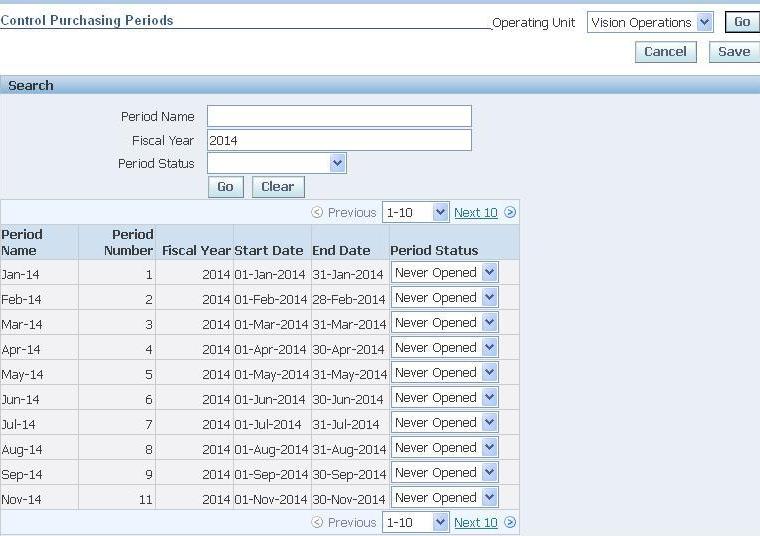
Purchasing Periods
1. Navigate to Purchasing SuperUser->Setup->Financials->Accounting->Control Purchasing Periods , then enter the Fiscal year and click Go button.
(If it prompts for selecting Operating Unit,select it and click Go button.)
2. Then open the periods by changing the Period Status and click on Save button.
Payables Period
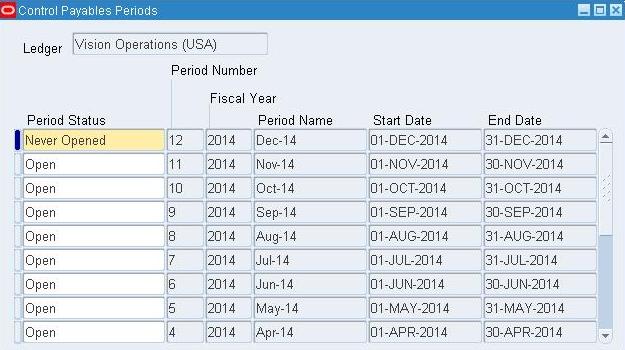
1. Navigate to Payables Super User or Payable Manager->Accounting->Control Payables Periods , then open the periods by changing the Period Status and click on Save button.
General Ledger Periods
1. Navigate to General Ledger Super User->Setup->Open/Close, then the Ledger and click find.
2. Now open the required periods by clicking “Open Periods” button,select the required period as Target Period and click Open button.

Inventory Periods
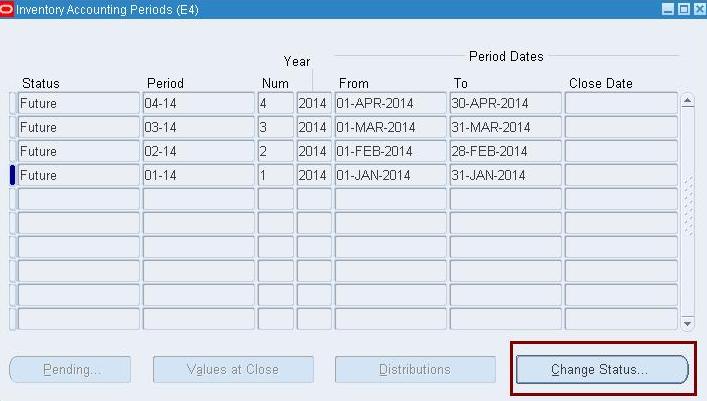
1. Navigate to Inventory SuperUser->Accounting Close Cycle->Inventory Accounting Periods and select the Inventory Org from LOV.
2. Select the period to be opened and click on Change Status button.
References:
Tuesday, June 24, 2014
Inventory Transaction data flow
• MTL_TRANSACTIONS_INTERFACE: This is the interface point between non-Inventory applications and the Inventory transaction module. The Transaction Manager concurrent program polls this table at a user-specified process interval and submits the transaction workers to process them. Processing consists of data derivation, validation, and transfer of records from MTL_TRANSACTIONS_INTERFACE, MTL_TRANSACTION_LOTS_INTERFACE, and MTL_SERIAL_NUMBERS_INTERFACE into their respective TEMP tables, from where they are processed by the transaction processor.
• MTL_MATERIAL_TRANSACTIONS_TEMP: This table is the gateway for all material transactions. Records are processed from this table into Inventory through the transaction processor. All Inventory transaction forms write directly to this table. Outside applications must write transaction records to MTL_TRANSACTSIONS_INTERFACE TXN Processor makes use of TXN worker to process the transactions from MTL_TRANSACTIONS_INTERFACE to MTL_MATERIAL_TRANSACTIONS_TEMP and from MTL_MATERIAL_TRANSACTIONS_TEMP to MTL_MATERIAL_TRANSACTIONS..
• MTL_MATERIAL_TRANSACTIONS: This table stores a record of every material transaction or cost update performed in Inventory. Records are inserted into this table either through the transaction processor or by the standard cost program. The primary key is TRANSACTION_ID.
• MTL_TRANSACTION_ACCOUNTS: This table holds the accounting information for each material transaction in MTL_MATERIAL_TRANSACTIONS. Oracle Inventory uses this information to track the financial impact of your quantity moves.
Read more: http://functionalguy.blogspot.com/2010/05/inventory-transaction-data-flow.html#ixzz35ZeMJ7oK
Monday, June 23, 2014
How to get details about patch applied in Oracle Applications by OAM & SQL?
There are some tables in oracle apps (AD tables especially) involved when applying patches.
Some of them are very useful when we need specific information about patch already applied.
I will show the main tables and afterwards some handy related SQL’s to retrieve patch applied details and how we can also get all this information via OAM.
AD_APPLIED_PATCHES – The main table when we are talking about patches that applied in Oracle Apps.
This table holds information about the "distinct" Oracle Applications patches that have been applied.
If 2 patches happen to have the same name but are different in content (e.g. "merged" patches), then they are considered distinct and this table will therefore hold 2 records (eTRM).
I also found that if the applications tier node is separate from the concurrent manager node, and the patch applied on both nodes, this table will hold 2 records, one for each node.
AD_PATCH_DRIVERS – This table holds information about all patch drivers included in specific patch.
For example if patch contain only one unified driver like u[patch_name].drv then ad_patch_drivers will hold 1 record.
On the other hand, if patch contain more than 1 driver, for example d[patch_name].drv and c[patch_name].drv, this table will hold 2 records.
AD_PATCH_RUNS – holds information about each execution of adpatch for a specific patch driver.
In case a patch contains more than one driver, this table will hold a record for each driver.
This table also holds one record for each node the patch driver has been applied on (column APPL_TOP_ID).
AD_PATCH_RUN_BUGS – holds information about all the bugs fixed as a part of specific run of adpatch.
AD_BUGS – this table holds information about all bug fixes that have been applied.
We have 2 options to view applied patch information:1) via OAM – Oracle Applications Manager
2) Via SQL queries
With OAM it’s easy and very intuitive, from OAM site map -> “Maintenance” tab -> “Applied Patches” under Patching and Utilities.

Search by Patch ID will get all information about this patch; In addition, drill down by clicking on details will show the driver details.

For each driver we can use the buttons (Timing Details, Files Copied, etc.) to get more detailed information.
With SQL we can retrieve all the above information, sometimes more easily.
For example: How to know which modules affected by specific patch?
With OAM:
1) search patch by Patch ID
2) click on Details
3) For each driver click on “Bug Fixes” and look on product column.
With SQL:
Run the following query, it will show you all modules affected by specific patch in one click…
select distinct aprb.application_short_name as "Affected Modules"
from ad_applied_patches aap,
ad_patch_drivers apd,
ad_patch_runs apr,
ad_patch_run_bugs aprb
where aap.applied_patch_id = apd.applied_patch_id
and apd.patch_driver_id = apr.patch_driver_id
and apr.patch_run_id = aprb.patch_run_id
and aprb.applied_flag = 'Y'
and aap.patch_name = '&PatchName';
Another SQL will retrieve basic information regarding patch applied, useful when you need to know when and where (node) you applied specific patch:
select aap.patch_name, aat.name, apr.end_date
from ad_applied_patches aap,
ad_patch_drivers apd,
ad_patch_runs apr,
ad_appl_tops aat
where aap.applied_patch_id = apd.applied_patch_id
and apd.patch_driver_id = apr.patch_driver_id
and aat.appl_top_id = apr.appl_top_id
and aap.patch_name = '&PatchName';
To check if specific bug fix is applied, you need to query the AD_BUGS table only.
This table contains all patches and all superseded patches ever applied:
select ab.bug_number, ab.creation_date
from ad_bugs ab
where ab.bug_number = '&BugNumber';
For any question or additional information you are welcome to leave a comment...
References:
http://oracle-apps-dba.blogspot.com/2007/10/how-to-get-details-about-patch-applied.html
Some of them are very useful when we need specific information about patch already applied.
I will show the main tables and afterwards some handy related SQL’s to retrieve patch applied details and how we can also get all this information via OAM.
AD_APPLIED_PATCHES – The main table when we are talking about patches that applied in Oracle Apps.
This table holds information about the "distinct" Oracle Applications patches that have been applied.
If 2 patches happen to have the same name but are different in content (e.g. "merged" patches), then they are considered distinct and this table will therefore hold 2 records (eTRM).
I also found that if the applications tier node is separate from the concurrent manager node, and the patch applied on both nodes, this table will hold 2 records, one for each node.
AD_PATCH_DRIVERS – This table holds information about all patch drivers included in specific patch.
For example if patch contain only one unified driver like u[patch_name].drv then ad_patch_drivers will hold 1 record.
On the other hand, if patch contain more than 1 driver, for example d[patch_name].drv and c[patch_name].drv, this table will hold 2 records.
AD_PATCH_RUNS – holds information about each execution of adpatch for a specific patch driver.
In case a patch contains more than one driver, this table will hold a record for each driver.
This table also holds one record for each node the patch driver has been applied on (column APPL_TOP_ID).
AD_PATCH_RUN_BUGS – holds information about all the bugs fixed as a part of specific run of adpatch.
AD_BUGS – this table holds information about all bug fixes that have been applied.
We have 2 options to view applied patch information:1) via OAM – Oracle Applications Manager
2) Via SQL queries
With OAM it’s easy and very intuitive, from OAM site map -> “Maintenance” tab -> “Applied Patches” under Patching and Utilities.

Search by Patch ID will get all information about this patch; In addition, drill down by clicking on details will show the driver details.

For each driver we can use the buttons (Timing Details, Files Copied, etc.) to get more detailed information.
With SQL we can retrieve all the above information, sometimes more easily.
For example: How to know which modules affected by specific patch?
With OAM:
1) search patch by Patch ID
2) click on Details
3) For each driver click on “Bug Fixes” and look on product column.
With SQL:
Run the following query, it will show you all modules affected by specific patch in one click…
select distinct aprb.application_short_name as "Affected Modules"
from ad_applied_patches aap,
ad_patch_drivers apd,
ad_patch_runs apr,
ad_patch_run_bugs aprb
where aap.applied_patch_id = apd.applied_patch_id
and apd.patch_driver_id = apr.patch_driver_id
and apr.patch_run_id = aprb.patch_run_id
and aprb.applied_flag = 'Y'
and aap.patch_name = '&PatchName';
Another SQL will retrieve basic information regarding patch applied, useful when you need to know when and where (node) you applied specific patch:
select aap.patch_name, aat.name, apr.end_date
from ad_applied_patches aap,
ad_patch_drivers apd,
ad_patch_runs apr,
ad_appl_tops aat
where aap.applied_patch_id = apd.applied_patch_id
and apd.patch_driver_id = apr.patch_driver_id
and aat.appl_top_id = apr.appl_top_id
and aap.patch_name = '&PatchName';
To check if specific bug fix is applied, you need to query the AD_BUGS table only.
This table contains all patches and all superseded patches ever applied:
select ab.bug_number, ab.creation_date
from ad_bugs ab
where ab.bug_number = '&BugNumber';
For any question or additional information you are welcome to leave a comment...
References:
http://oracle-apps-dba.blogspot.com/2007/10/how-to-get-details-about-patch-applied.html
Subscribe to:
Posts (Atom)